Calculate Vegetation Loss/Gain indicators
To compute vegetation loss/gain on the service platform,
On the services menu, select the ‘VEGETATION GAIN/LOSS’ option

Finding the forest change service
If the selected region is a large area, the user will be prompted to select a smaller region. Select a smaller region on the ‘Select Country’ dialog on the top left conner of the dashboard
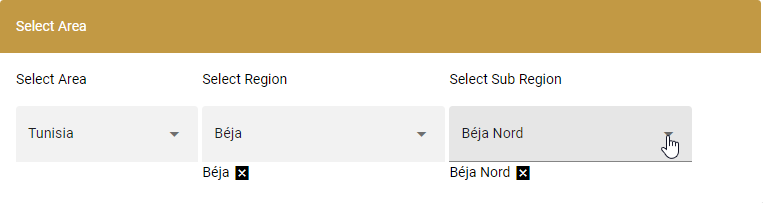
seleting a region to compute vegetation gain/loss
Note
Selection of a smaller regin optimizes the computation time and ensures that the service does not time-out. If a large area is selected, users will be notifed by a pop up on the top right conner of the site. Computation of large ares is still under development and will be available in later versions of the service.
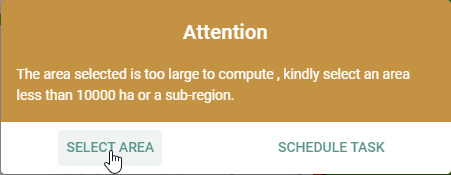
Pop-up notification when large area is selected.
Next, select the start and end period for which the vegetation loss and gain will be computed.
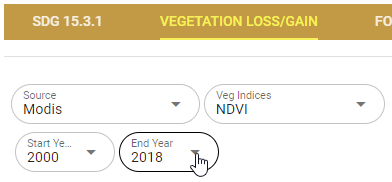
Vegetation gain/loss outputs
To compute vegetation indices using Landsat derived vegetation indices,
On the services menu, select the ‘VEGETATION GAIN/LOSS’ option, and under the ‘Source’ dropdown menu, select Landsat 7 option
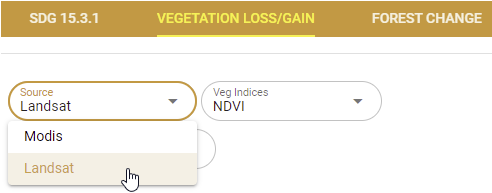
Selecting the Landsat-derived vegetation index option
On the ‘Veg index’ dropdown, select the vegetation index to compute and select the start and end period
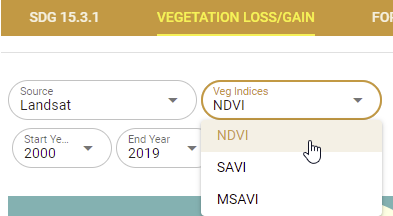
Choosing the vegetation index to compute
The map and computed statistics will be displayed on the map panel and summary pannel respectively.

Landsat derived vegetation loss and gain output